Webflow Website Maintenance Plan for Accounting Firms

You don’t have time to babysit a website. You’re signing clients, reviewing numbers, and trying to keep the team focused. But quietly in the background, a slow or slightly broken site can leak enquiries, confuse prospects, and chip away at the trust you’ve worked hard to build. That’s where a clear Webflow website maintenance plan earns its keep: it turns “I hope the site is fine” into a simple, predictable Webflow care plan and checklist.
This guide breaks down what maintenance actually means in Webflow, what you can safely ignore, what you can’t, and how to decide between DIY and done-for-you support—specifically for accounting and finance firms.
What Webflow Website Maintenance Actually Means for Your Firm
Your website might be “live,” but that doesn’t mean it’s truly working for you. If nobody is watching what happens after a prospect lands on your site, you’re relying on luck instead of a system. Understanding what Webflow maintenance actually covers is the first step to protecting your pipeline.
I. A Simple Definition of Webflow Website Maintenance
Once your Webflow site launches, it doesn’t magically look after every detail on its own.
Webflow website maintenance is the ongoing habit of checking that your site is working, current, and aligned with your firm’s goals. In plain English, it means making sure enquiry paths such as forms, bookings, and newsletter sign-ups still work, that key pages reflect your current services, pricing, and team, and that the site stays reasonably fast, easy to use, and visible in search.
It’s less about tinkering with code and more about protecting three things. Reliability, so prospects can always reach you; leads, so people who are ready to talk don’t get stuck on a broken step; and trust, so your site looks and feels like a professional firm you’d want handling your books. That trust piece matters: studies on web credibility have found that well over two-thirds of users say they judge a business’s credibility based largely on the look and feel of its website and design, so a neglected site does more damage than most firms realise.
For a professional services firm, this isn’t a “nice to have.” It’s part of running the business, just like reconciling accounts or renewing insurance.
II. What Webflow Handles Automatically vs What Still Needs Attention
One reason many firms choose Webflow is that it takes a big chunk of technical maintenance off your plate.
What Webflow handles for you automatically:
- Hosting and uptime: Webflow runs on its own infrastructure, so you’re not managing separate hosting or servers.
- Security patches and core updates: The platform updates itself behind the scenes instead of asking you to update plugins.
- SSL certificates: Webflow handles HTTPS/SSL, so visitors see the secure padlock in the browser.
That’s a big difference from systems like WordPress, where you often have to track plugin updates and security hardening yourself.
But Webflow doesn’t:
- Notice that your contact form now sends to a former manager’s inbox.
- Realise your Calendly or meeting link has expired.
- Rewrite outdated service pages when you change your niche or pricing.
- Fix broken integrations if your CRM, email service, or analytics settings change (integrations here just mean the way your tools talk to each other—for example, Webflow, your CRM, and your email platform).
“Low maintenance” is not “no maintenance.” Webflow removes a lot of infrastructure stress, but someone still needs to keep an eye on the business-critical bits: content, enquiries, and integrations. Once you’re clear on that split, it’s easier to see what happens when nobody is watching those business-critical pieces.
III. What Happens When You Skip Webflow Website Maintenance
When nobody owns maintenance, problems often stay invisible until they’re expensive:
- Quietly broken lead paths: A contact form error or calendar issue can run for weeks before someone spots it. That’s a stream of missed enquiries from CFOs, controllers, and founders who will never chase you—they’ll just go back to Google.
- Slower pages and SEO decline: Over time, uncompressed images, endless blog posts, and tracking scripts can weigh down load times. A neglected site can slide down the rankings and lose visibility. Google’s own research has shown that as page load time moves from 1 to 3 seconds, the probability of a visitor bouncing increases by about 32%, so shaving off even a second or two of delay can make a noticeable difference to how many prospects stay on the page.
- Outdated content and bios: A partner who left years ago still appears on the site; COVID-era messaging still sits on your homepage; service pages don’t mention the new advisory or FP&A offers. All of this quietly erodes credibility with the very decision-makers you’re trying to impress.
The risk isn’t dramatic downtime. It’s slow, compounding damage to your pipeline. Skipping Webflow maintenance is like ignoring a blinking engine light—you might keep driving for a while, but you’re one broken form away from your website deciding to pull over and quit on you.
Your Practical Webflow Website Maintenance Plan
You don’t need a full-time webmaster to keep your site healthy. You just need a simple rhythm of checks that fit around client work instead of competing with it. This practical Webflow maintenance plan shows you exactly what to do monthly, quarterly, and yearly so nothing falls through the cracks.
Instead of “we’ll check the site when we remember,” use a simple rhythm: monthly, quarterly, and yearly. Treat it as your reusable Webflow maintenance checklist. If this feels like a lot right now, remember that most of these checks only take a few minutes once you’re using the same checklist each time.
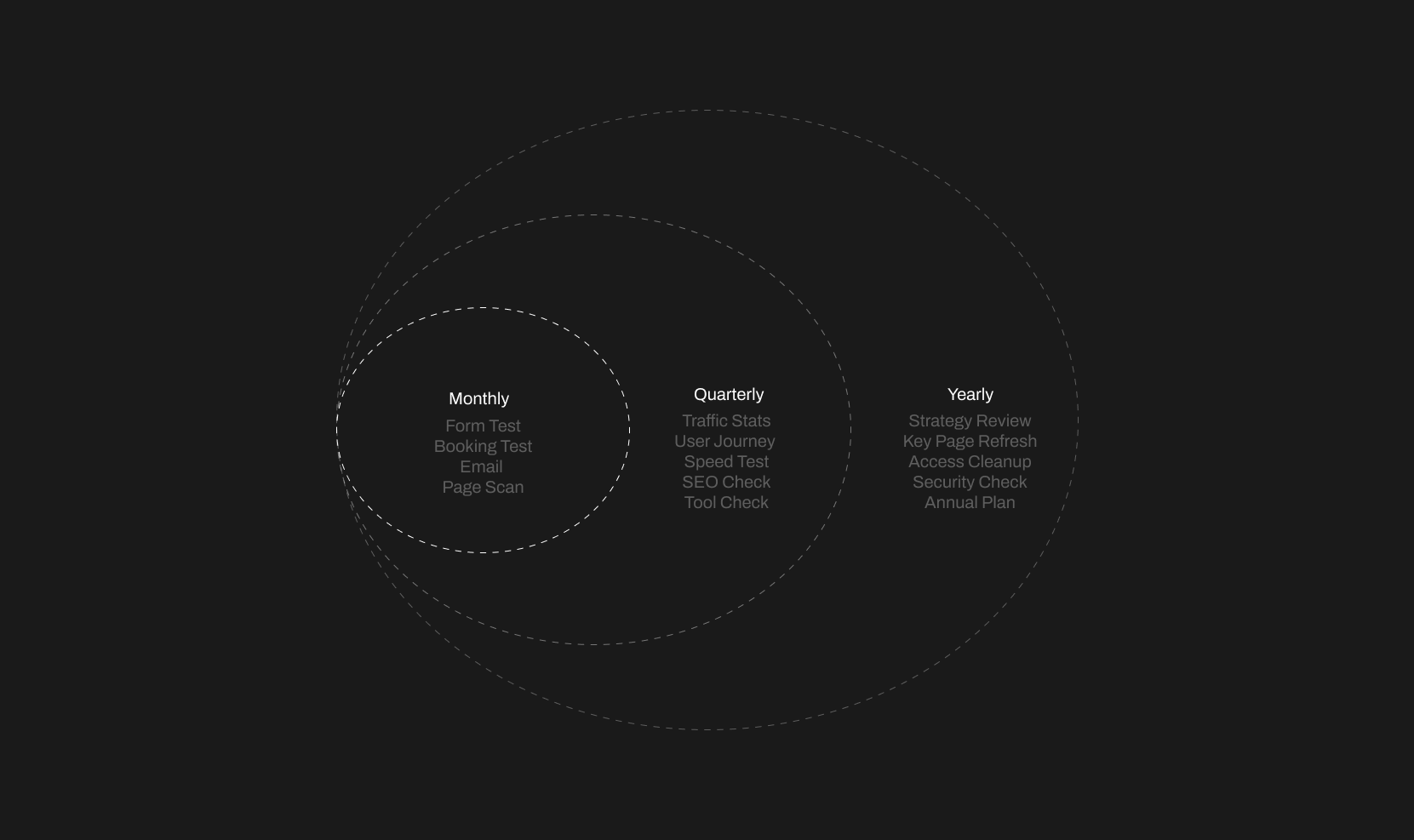
I. Monthly: Test Lead Paths, Content Freshness, and Basic Integrations
Think of the monthly review as a 30–45 minute spot check.
- Test core lead paths: Test your core lead paths by submitting your own contact form as if you were a new prospect, booking a slot through your online scheduling link, and signing up for your newsletter or lead magnet. Treat this like a mini mystery-shopper exercise on your own firm.
- Confirm notifications work: After each test, check where the emails land. Are they going to the right shared inbox? Do they land in spam? Are any still sending to a former partner? If you skip this, your website can end up ghosting perfectly good prospects—and not even the fun Halloween kind.
- Scan key pages for obvious issues: Do a quick read-through of your home page, your main services pages (such as “Tax Services,” “Outsourced CFO,” or “Audit & Assurance”), your pricing or engagement model page, and one or two traffic-driving blog posts. You’re looking for typos, old offers, wrong dates, and simple CMS updates, like refreshing a testimonial or swapping an outdated image. Small tweaks here keep the site feeling current without major effort.
II. Quarterly: Review Analytics, UX, Speed, SEO, and Integrations
Once a quarter, zoom out a little. This is a good time to block a one-hour slot.
- Look at simple analytics signals: You don’t need to be a data analyst. Using a tool like Google Analytics, focus on which pages get the most visits, which ones bring people in from Google, and how people move along basic conversion paths such as “Blog → Services → Contact.” If a page attracts a lot of traffic but hardly any enquiries, you may need clearer calls-to-action or better internal links.
- Walk the site like a prospect: On both desktop and mobile, click through as if you were a CFO or founder visiting for the first time. Ask yourself whether the site loads quickly enough to feel “instant,” whether navigation is simple and obvious, and whether fonts are readable—especially on mobile. Note any clunky layouts or confusing journeys so someone can tidy them up.
- Run quick speed and SEO checks: Use simple tools (like Google PageSpeed Insights or a basic SEO checker) on a few key pages and look for very large images that slow things down, obvious technical issues such as missing titles or broken meta descriptions, and broken links on high-traffic or high-intent pages. While you’re there, spot-check your integrations: is Google Analytics still tracking? Are CRM and email tools still connected? A quarterly glance can prevent months of missing data. Performance work is worth the effort: case studies from brands like Walmart show that even a one-second improvement in page load time can lift conversions by around 2%, which adds up quickly when those conversions are high-value advisory or compliance engagements.
III. Yearly: Align Your Webflow Site, Access, and Security with Your Firm’s Strategy
Once a year, treat your site like a digital office you’re walking through before a refurbishment.
- Check alignment with your current strategy: Start by asking whether your pages still reflect your actual niche—whether that’s SaaS clients, professional services, e-commerce businesses, or local SMEs—and whether you’re clear about the locations you serve, from local to regional to global. Then consider whether the messaging still fits your ideal client type and typical deal size, or if it sounds like a past version of your firm.
- Refresh high-value content in depth: Instead of rewriting everything, pick the pages that drive the most value: your flagship service pages, your pricing or engagement model, your “About” page, your case studies, and your evergreen articles. Update them to match your current offering, process, and results, so prospects see your strongest, most accurate positioning the moment they land.
- Review access and security: Use this yearly review to remove former staff and vendors from Webflow and any connected tools, to confirm that owners and key staff have the right level of access, and to sketch a simple 12-month roadmap that lists which new pages, resources, or funnels you want to add in the coming year. This keeps both security and strategy tight.
A yearly review keeps the site moving with your firm, instead of lagging two or three years behind.
DIY vs Done-For-You Webflow Maintenance for Accounting Firms
At some point, your website stops being a brochure and becomes a core part of how you win work. That’s when the question changes from “Can we do this ourselves?” to “Should we?” This section helps you decide when DIY Webflow maintenance is enough and when it’s smarter to hand the reins to a specialist.
I. When DIY Webflow Website Maintenance Can Work
Some firms are well-positioned to handle their own Webflow maintenance services in-house.
DIY can make sense if:
- You have at least one partner, manager, or admin who’s comfortable clicking around Webflow and following a checklist.
- You’re willing to reserve a recurring slot—say, the first Monday of the month—for maintenance tasks.
- You’re happy to call in a developer or studio when you hit limits (for example, complex performance issues or custom script bugs).
In this setup, you keep control while still protecting lead flow and user experience.
II. Signs It’s Time to Outsource Webflow Maintenance to a Studio
At some point, your site graduates from a simple “digital brochure” to an infrastructure that underpins enquiries and reputation. Common signs you’ve crossed that line:
- Monthly or quarterly checks keep getting bumped by client work.
- You discover broken forms or tracking only when someone complains.
- You’re worried about Core Web Vitals (Google’s basic page-experience scorecard for speed and stability), SEO, or complex integrations but don’t want to become a technical project manager.
If you find yourself thinking, “I do not want this on my personal to-do list,” that’s a strong indicator it’s time to partner with a Webflow maintenance specialist.
III. What a Good Webflow Maintenance Partner Actually Handles
A solid Webflow partner quietly takes over the background work so you can stay focused on clients.
Behind the scenes, they should be handling:
- Technical performance and Core Web Vitals: Optimising images, cleaning up layouts, and fixing layout shifts that make pages feel jumpy.
- Ongoing SEO upkeep: Managing redirects when URLs change, keeping sitemaps clean, resolving search console warnings, and adding useful structured data (for example, FAQ schema on key pages—extra code that helps search engines understand what’s on the page).
- Integrations and risk reduction: Making sure analytics, CRM, and email tools stay connected; checking backups; and taming third-party scripts so they don’t slow the site or break forms.
From your side, the experience should feel like having a “website department” you can message when you need something done.

How Margined Handles Webflow Maintenance for Accounting & Finance Firms
If you’ve decided you don’t want Webflow maintenance on your personal to-do list, here’s how Margined handles it for accounting and finance firms. If you’d rather treat website care like utilities—reliable, predictable, mostly invisible—you need a partner who works the same way. Margined is built around that idea: calm, ongoing Webflow support and maintenance designed for accounting and finance firms. Here’s what that looks like in practice, from our workflow to the results you’ll actually feel.
I. Our Ongoing Webflow Maintenance Workflow in Plain Language
At Margined, we design Webflow maintenance plans around your business calendar, not ours.
Instead of random tweaks, we group tasks into the same cadence you saw above and tie them to your busy seasons. For example:
- Light visual checks and form testing during peak tax or audit periods, so you’re not approving big changes mid-crunch.
- Deeper UX and SEO work in quieter months, when you’re more available to approve messaging or new assets.
Most of the work is quiet: we log in, run through the checklist, fix issues, and document what changed. No drama, no surprise redesign projects.
II. What You See as the Firm Owner (Reports and Check-Ins)
You shouldn’t need to read a developer-level report to understand what’s happening with your site.
From your side, you’ll see:
- Short, human-readable summaries: What we checked, what we fixed, and what still needs attention.
- A prioritised list of next steps: Recommended improvements ranked by impact on leads, trust, and risk, so you can decide what to green-light.
- Optional check-ins: Quick calls or Loom videos aligned with your planning and budgeting cycles, not whenever the agency feels like it.
The goal is to give you clarity and control without dragging you into technical detail.
III. The Results of Consistent Webflow Website Maintenance Over Time
When Webflow maintenance becomes a steady habit instead of a once-every-few-years scramble, you tend to see:
- Fewer nasty surprises: Website issues are caught in routine checks, not during a board meeting.
- A site that quietly stays current: Content, offers, and case studies evolve with your firm, so you can delay expensive redesigns.
- More headspace for client work: Your team can focus on advisory, audits, and tax planning while the website does its job in the background—generating enquiries and building trust.
That’s the outcome we optimise for: calm, predictable performance from a site that supports your growth.
Final Thoughts: Turn Webflow Website Maintenance into a Simple Habit
You don’t need a complex technical process to keep your Webflow site in good health. You need a clear Webflow website maintenance rhythm, a simple checklist, and a realistic decision about whether you’ll own the work in-house or hand it to a partner.
If you treat your website like a living asset—one that deserves regular checks and small, frequent improvements—you’ll spend far less time fighting fires and far more time talking to the right clients.
Frequently Asked Questions
Does Webflow Require Ongoing Maintenance?
Webflow handles hosting, security updates, and SSL for you, so you don’t have to manage servers or plugins. You still need basic maintenance to test forms, keep content up to date, and watch SEO so the site keeps doing its job.
What Is a Website Maintenance Plan?
A website maintenance plan is a repeatable checklist of tasks that keep your site secure, fast, accurate, and working as expected. For Webflow, that usually covers form checks, content updates, basic performance and SEO checks, integration reviews, and access/security reviews.
Why Is Website Maintenance Important for Accounting Firms?
Your website is often a prospect’s first experience of your firm. Ongoing maintenance keeps it secure, quick to load, easy to use, and accurate, which means more qualified enquiries and fewer credibility hits from outdated or broken pages.
N

.webp)